When you’re using a (hardware) load balancer in combination with Exchange Server 2010 you might want to offload SSL from the Exchange servers to the load balancers. This way you get more options available for persistence in the load balancer.
Enabling SSL offloading in Exchange 2010 is not that difficult but it consists of several steps which can be prone to error if you have to configure this on multiple servers (which is most likely the case of course with a load balancer).
Enabling SSL offloading for Outlook Anywhere is just a matter of checking the Allow secure channel (SSL) offloading in the Exchange Management Console.

For other HTTPS services like OWA, ECP, ActiveSync etc. it is a bit more work. First you have to enable SSL offloading for OWA in the registry by creating a REG_DWORD named SSLOffload in the HKLM\System\CurrentControlSet\Services\MSExchange OWA key.
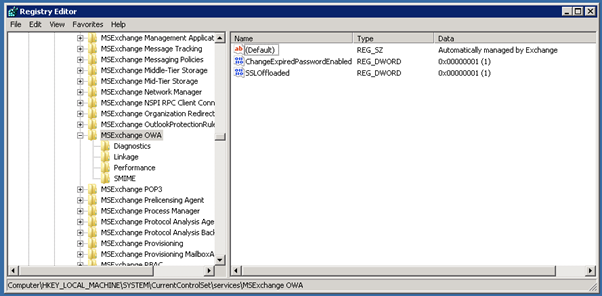
When done you have to open the IIS Manager and in all virtual directories for Exchange 2010 you have to select SSL Settings and uncheck the Require SSL option.

You have to repeat this for all Exchange virtual directories (OWA, ECP, Autodiscover, EWS, Microsoft-Server-ActiveSync and OAB).
If you have multiple Exchange 2010 servers in your organization you’re better off using the Exchange Management Shell. Just use these commands:
Set-OutlookAnywhere –Identity "$($env:COMPUTERNAME)\RPC (Default Web Site)" -SSLOffloading $true

New-ItemProperty -Path 'HKLM:\SYSTEM\CurrentControlSet\Services\MSExchange OWA' -Name SSLOffloaded -Value 1 -PropertyType DWORD

Import-Module webadministration

Set-WebConfigurationProperty -Filter //security/access -name sslflags -Value "None" -PSPath IIS:\ -Location "Default Web Site/OWA"

Set-WebConfigurationProperty -Filter //security/access -name sslflags -Value "None" -PSPath IIS:\ -Location "Default Web Site/ECP"

Set-WebConfigurationProperty -Filter //security/access -name sslflags -Value "None" -PSPath IIS:\ -Location "Default Web Site/OAB"

Set-WebConfigurationProperty -Filter //security/access -name sslflags -Value "None" -PSPath IIS:\ -Location "Default Web Site/EWS"

Set-WebConfigurationProperty -Filter //security/access -name sslflags -Value "None" -PSPath IIS:\ -Location "Default Web Site/Microsoft-Server-ActiveSync"

Set-WebConfigurationProperty -Filter //security/access -name sslflags -Value "None" -PSPath IIS:\ -Location "Default Web Site/Autodiscover"

iisreset /noforce


3 thoughts on “SSL offloading with Powershell”